
Production release with the feature to rescind the child's enrollment before they are starting their enrollment.
And, analysis in progress to provide the ability to cancel / update the program with the past period and update the end date of the already completed program. Will keep you updated on this when it is available.
Rescind Enrollment for Incoming Children
Earlier 1Core does not support canceling an enrollment without modifying its enrollment period (Start Date and End Date). As a result, centers cannot accurately track or report on families who cancel their enrollment before the scheduled start date.
What’s New:
To address this limitation, we are introducing the Rescind Enrollment feature, which allows centers to cancel a child’s upcoming enrollment before its enrollment start date without changing the enrollment period. This helps centers maintain accurate enrollment records and easily identify families who decide not to proceed with enrollment.
- Rescind Upcoming Enrollments: Directors can rescind a child’s enrollment before the program start date.
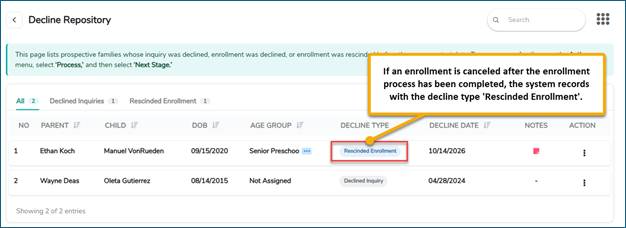
- Track Rescind Enrollments: The child’s record moves to the Decline Repository with a Declined status and an Enrollment Canceled icon for easy identification.
- Retain Family Account Access: The family remains in the system as Inactive, allowing centers to view the child’s ledger, issue refunds, and access account statements. Use the Inactive filter in the Families list to locate the family.
- Support Families with Multiple Children: The family’s status is determined by the enrollment status of their other children.
How It Works
- Open the Incoming Family detail through the CRM- Enrollment +.
- Click on the ‘Action’ menu to access the quick options associated with the ‘Incoming’ enrollment.
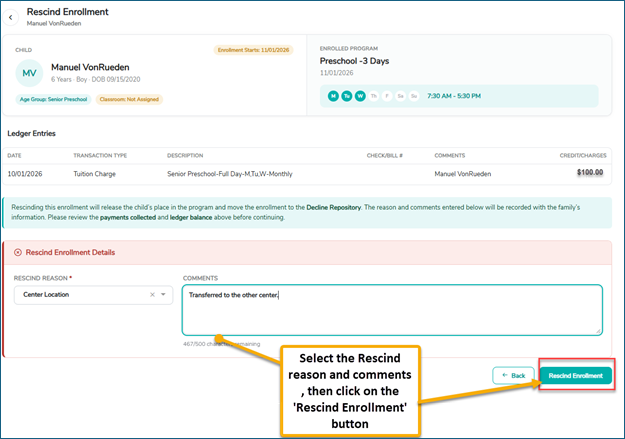
3. Click on the ‘Rescind Enrollment’ option and then select a cancellation reason (required) and add comments.
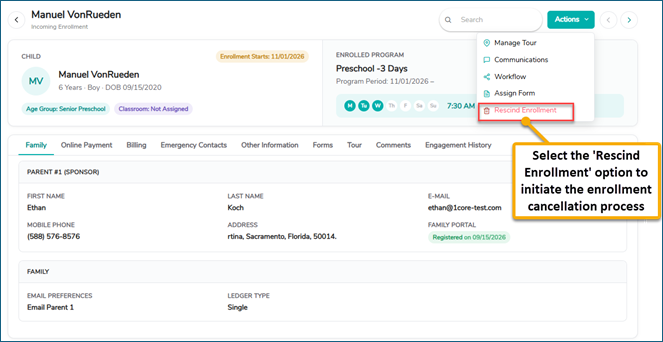
- Select Rescind Enrollment, then select Yes to confirm and complete the rescind process.
4. Upon successful enrollment cancellation, the system moves the child’s enrollment to the Declined status in the Decline Repository. The family’s status is determined based on the enrollment status of the children associated with that family.
Family Status:
- Only Child: If the family has only one child, the family status changes to Inactive.
- Multiple Children: If the family has more than one child, the family status is determined by the enrollment status of the other children.
Note: The system automatically records the cancellation date and adds the cancellation to the Engagement History. Refunds are not processed automatically and must be handled separately.